Note Bounce vs Synthesia: Falling Notes or Real Sheet Music?
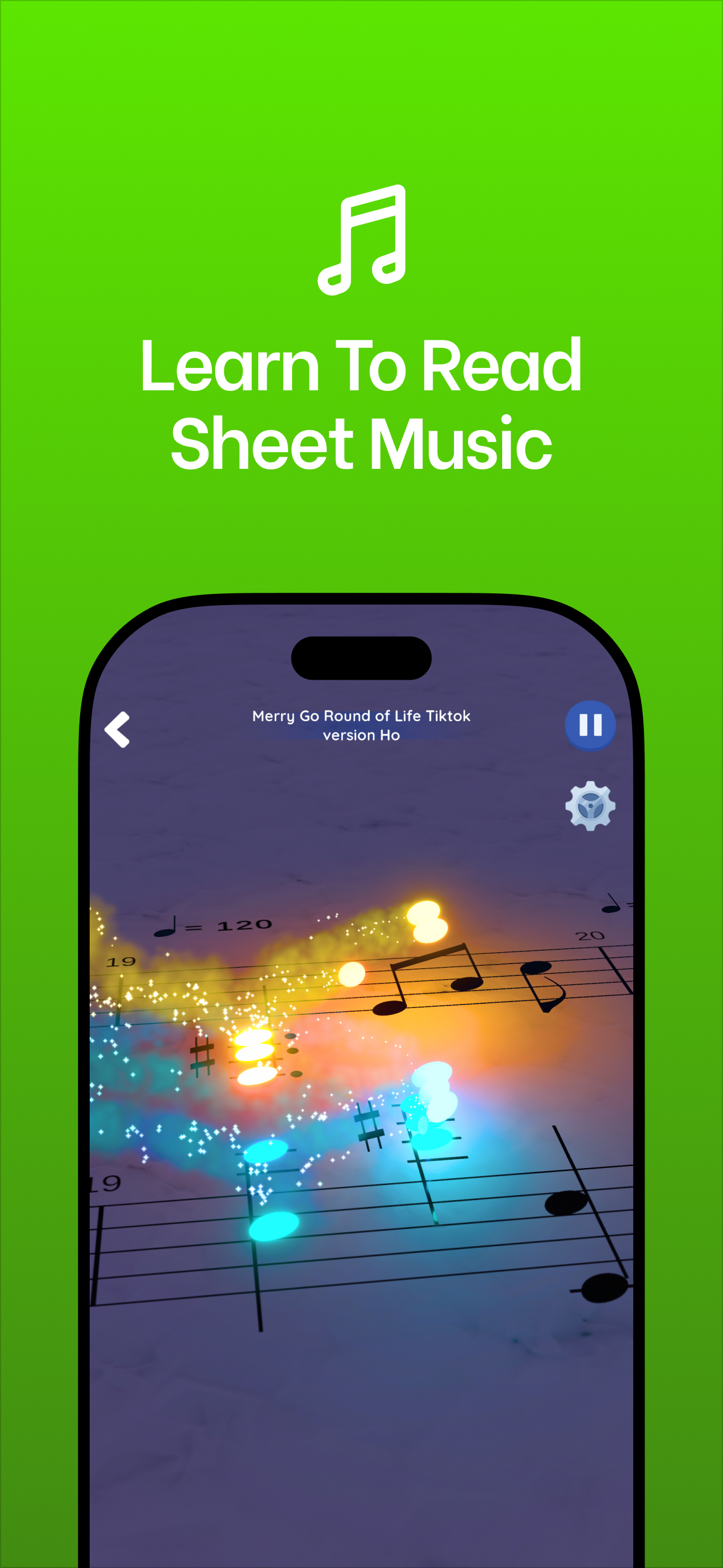
Synthesia and Note Bounce solve different problems. Synthesia is a falling-notes piano trainer that works best with a connected keyboard and teaches you which keys to press. Note Bounce is a rhythm game where bouncing balls land on real sheet music, so it trains you to read notes and rhythm on the staff. If you want to play songs on a keyboard soon, start with Synthesia; if you want to read notation, start with Note Bounce; many learners benefit from both.
This comparison sticks to what each app's official pages say. Synthesia's details come from synthesiagame.com; Note Bounce's come from its home page.
What each app actually is
Synthesia shows notes as colored bars falling toward an on-screen keyboard. When you connect a musical keyboard over USB or MIDI, it listens to your playing, and in melody practice it waits for you to hit the right note before moving on. It comes with a built-in song list, plays any MIDI or MusicXML file you load, and can display sheet music alongside the falling notes if you turn it on.
Note Bounce keeps the staff at the center. Balls bounce onto the notes of real sheet music in time, so your eyes stay on the notation while you follow the rhythm. It has piano and classical songs, imports MIDI files to build custom levels, works offline, and renders gameplay videos you can share.
Side by side
| Synthesia | Note Bounce | |
|---|---|---|
| Main view | Falling notes over a keyboard | Real sheet music with bouncing balls |
| Sheet music | Optional display you can toggle on | Always the main view |
| Best with | A connected MIDI/USB keyboard | Just the app |
| Your own songs | Loads MIDI and MusicXML files | MIDI import for custom levels |
| Platforms | Windows, macOS, Android and iPad, per its download page | iOS, Android and Steam (Windows, macOS) |
| Pricing model | Free to try, with a paid unlock for the full feature set and any song | Free, with in-app purchases |
| Extras | Practice modes that wait for you | Offline play, gameplay video rendering |
Prices and platforms change, so check each official page before you buy anything.
The real difference: where your eyes go
Falling-note displays are easy to follow because they map directly to keys: a bar above a key means "press this one". That's why they're so popular for learning a specific song quickly. The trade-off is that your eyes learn to read bars and key positions, not the staff. It's possible to learn many songs this way and still find a simple melody on a page hard to read.
Synthesia's own sheet-music option helps here, but only if you look at it. When both views are on screen, the falling bars are usually easier to follow, so most players drift toward them.
Note Bounce removes that choice. There is no falling-bar view to fall back on, so every round is practice at reading pitch on the lines and spaces and feeling rhythm as note lengths go by. It doesn't replace lessons, and it won't teach you fingering on a keyboard. It does build the reading habit that falling notes tend to skip.
Who each one suits
Pick Synthesia if:
- You own (or plan to buy) a MIDI or USB keyboard.
- Your goal is to play specific songs with your hands soon.
- You like a practice mode that waits until you hit the right key.
Pick Note Bounce if:
- Your goal is to read sheet music, for piano or any other instrument.
- You want short sessions on your phone, including offline.
- You want to turn practice into shareable videos.
Use both if: you're learning piano and want to read music as well. Learn the hand positions for a piece in Synthesia, then read the same piece in Note Bounce.
How to use them together
Here's a simple weekly routine for one public-domain piece, such as Ode to Joy or a Bach minuet:
- Get one MIDI file. Export it from a notation program such as MuseScore, or find a file on the Mutopia Project and check its license.
- Read it first in Note Bounce. Import the MIDI to build a level. Play it a few times and name the notes out loud as the balls land.
- Play it in Synthesia. Load the same MIDI file with sheet music turned on, and try to read the staff instead of the bars.
- Return to Note Bounce at the end of the week. If you read it more smoothly than on day one, the reading is sticking.
If you're starting from zero on note names, read the beginner's guide to reading sheet music before step 2.
If you mostly want a video
Some people searching for a Synthesia alternative don't want practice at all; they want a satisfying MIDI-to-video clip for TikTok or YouTube. For that, look at Marble Music (formerly Beat Bounce), which turns MIDI files into bouncing-marble music videos and renders them for TikTok, Reels and Shorts. Import the same file you used above and you get a shareable clip with no notation on screen. See Marble Music.
The short answer
Falling notes teach you where to put your hands. Real sheet music teaches you to read. Synthesia is built for the first, with sheet music as an option; Note Bounce is built for the second. Choose by goal, and if you want both skills, let them share the same MIDI file.
Frequently asked questions
Does Synthesia teach you to read sheet music?
Synthesia's main view is falling notes, but it can also show sheet music: its own guide explains how to turn notation on for any song. Whether you actually learn to read depends on whether you keep looking at the staff instead of the falling bars.
Can I use my own MIDI files in Note Bounce?
Yes. Note Bounce has MIDI import, so you can build custom levels from your own files, such as a public-domain piece exported from a notation program.
Get Note Bounce
Learn to read sheet music while you play. Free on iOS, Android and Steam.