How to Make a "Name the Note" Quiz Video From Sheet Music
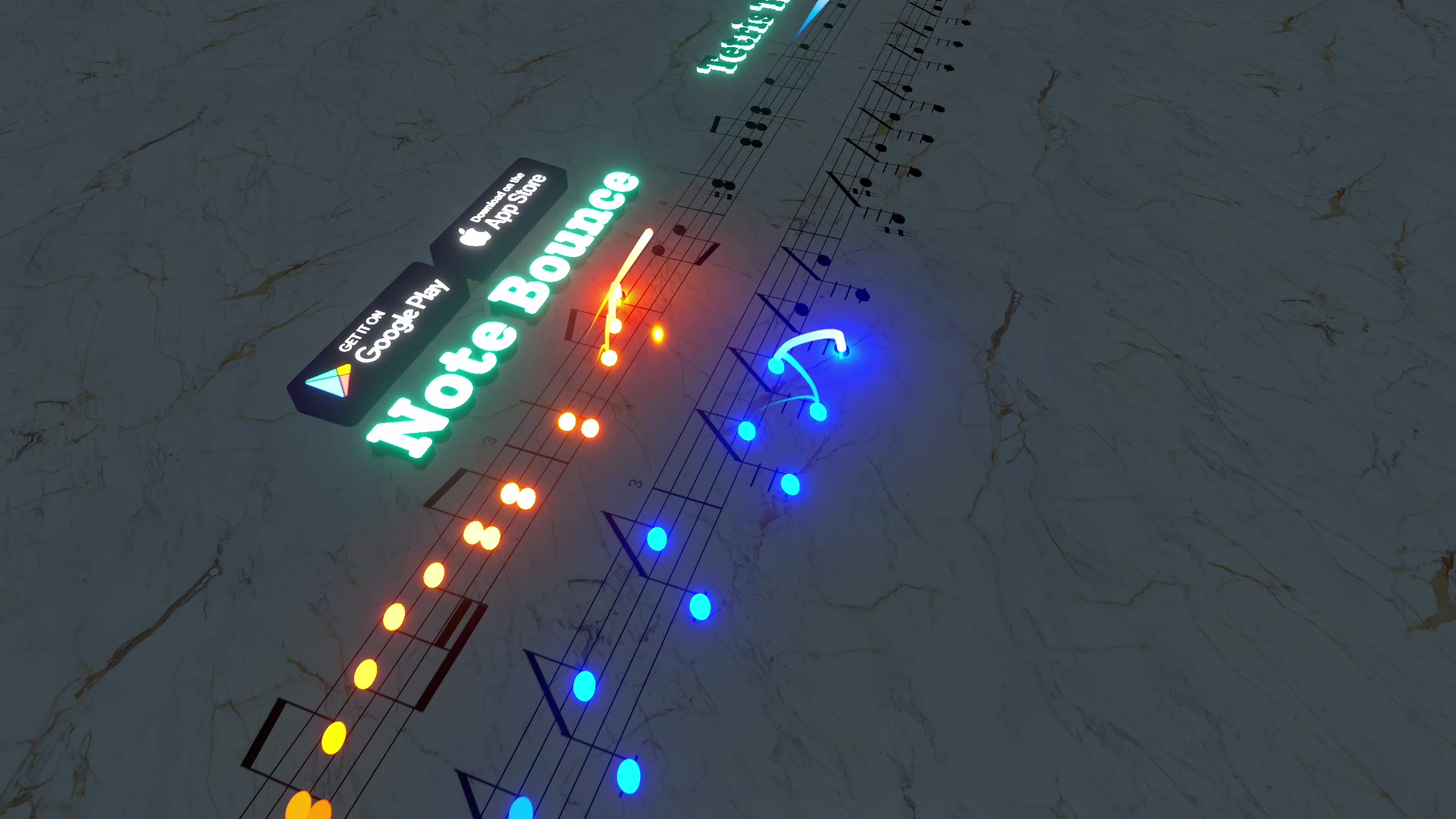
To make a "name the note" quiz video, render a short Note Bounce clip, cut it so it stops the moment a ball lands on one note, add the text "Comment the note name", and reveal the answer later in a pinned comment or a follow-up video. The whole thing takes a few minutes and works without a piano, a camera or your face on screen.
Quiz videos ask viewers to do something small and specific, and a one-word answer is the easiest comment there is to leave. That gives the video a better chance of starting a conversation, and the answers tell you exactly what your audience finds hard. Here's the full workflow, from picking the note to turning comments into your next post.
Step 1: pick a note people can actually answer
The quiz fails if nobody can answer it or if everybody finds it trivial. Choose by audience:
| Level | What to quiz | Example |
|---|---|---|
| Easy | One note on a line or space of the treble staff | The G on the second line |
| Medium | A note on a ledger line, or one with a sharp or flat | Middle C, or F sharp |
| Hard | The first three notes of a melody | "Name all three" |
| Expert | The melody itself, from the notes alone | "Which famous tune is this?" |
If you're unsure about line and space names yourself, the beginner's guide to reading sheet music covers them first. Double-check every answer before posting. A wrong answer key gets corrected in the comments fast.
Step 2: render the clip
In Note Bounce, the balls land on real sheet music, so the rendered gameplay is already a moving score.
- Choose a piece. For a public-domain melody that isn't in the game, import a MIDI file to build a custom level. Ode to Joy, Für Elise and Korobeiniki (the folk melody known as the Tetris theme) all have clear, recognizable openings.
- Play through the passage you'll use.
- Render the gameplay video and save it to your phone.
Here's the kind of footage you'll be working with:
Step 3: cut it on the quiz note
In your phone's editor or TikTok's own editor:
- Trim the clip so it ends just as a ball lands on the quiz note. For the "first three notes" format, end it after the third note.
- Hold the last frame for three to five seconds. Most editors let you freeze a frame or add a still image after the clip; a screenshot of the final frame works as a fallback.
- Add a simple arrow or circle on the quiz note so there's no doubt which one you mean.
Keep the whole video short: a few seconds of movement to set the scene, then the freeze. Viewers should know the question within the first second, so put the text on screen from the start.
Step 4: write text that asks for a one-word answer
On-screen text and caption should ask the same question in different words. Some templates:
- On screen: "Name this note" / Caption: "Comment your answer. No piano needed, just look at the line."
- On screen: "Only readers get this" / Caption: "Which note does the last ball land on?"
- On screen: "Name all 3 notes" / Caption: "Comment them in order, like A B C."
- On screen: "Guess the song from the notes" / Caption: "Hint: it's over 200 years old."
Avoid asking two things at once. "Name the note and the key" splits answers and makes the comments hard to read.
Step 5: reveal the answer
You have three options, and you can mix them:
- Pinned comment. After a few hours, pin your own comment with the answer and a one-line explanation, such as "It's G. The treble clef curls around the G line."
- Reply video. Many platforms let you reply to a comment with a video. Pick a wrong answer that came up a lot and explain kindly why it's a common mistake.
- Part 2. Post the reveal as its own video, starting with the frozen frame from the quiz and then letting the clip play on.
Whichever you choose, say in the caption where the answer will be, so people come back.
Step 6: turn the answers into your next video
The comments are free research. Scan them and sort answers into right, wrong and "too easy" or "too hard":
- Lots of wrong answers on one note → make a short explainer on that note next.
- Everyone got it → move up a level in the table above.
- People asking for the song → make a full-length sheet-music render of it.
Run the quiz as a series with a fixed format, such as "Note quiz #1, #2, #3". Returning viewers learn the rules, and you get a reason to read real notation every day.
A note-reading quiz tests the eyes. For a melody-recognition round that tests the ears, try Marble Music (formerly Beat Bounce): import a MIDI, let the marble bounce on every note of the opening, and ask viewers to name the tune before the reveal. Alternating the two formats keeps a quiz series fresh. You can find it at Marble Music.
Post your first quiz
Start with the easy level: one note on the treble staff, from a melody you already know. Render it, freeze on the note, ask for a one-word answer, and pin the answer the next day. Then let the comments tell you what quiz #2 should be.
Frequently asked questions
How do I make quiz videos on TikTok?
Keep the question visible in the first second, give viewers one clear thing to answer in the comments, and reveal the answer later in a pinned comment or a follow-up video. A short screen recording or app render is enough; you don't need to film yourself.
Are music quizzes good for beginners?
Yes, as long as the quiz matches their level. Single notes on the lines and spaces of the treble staff are a good start; ledger lines, accidentals and short melodies make good harder rounds.
Get Note Bounce
Learn to read sheet music while you play. Free on iOS, Android and Steam.